

Introduction: Is Your vTiger CRM Server Secure?
If your business uses vTiger CRM to manage customer records, sales opportunities, invoices, support tickets, and other important information, now is a good time to review your server security.
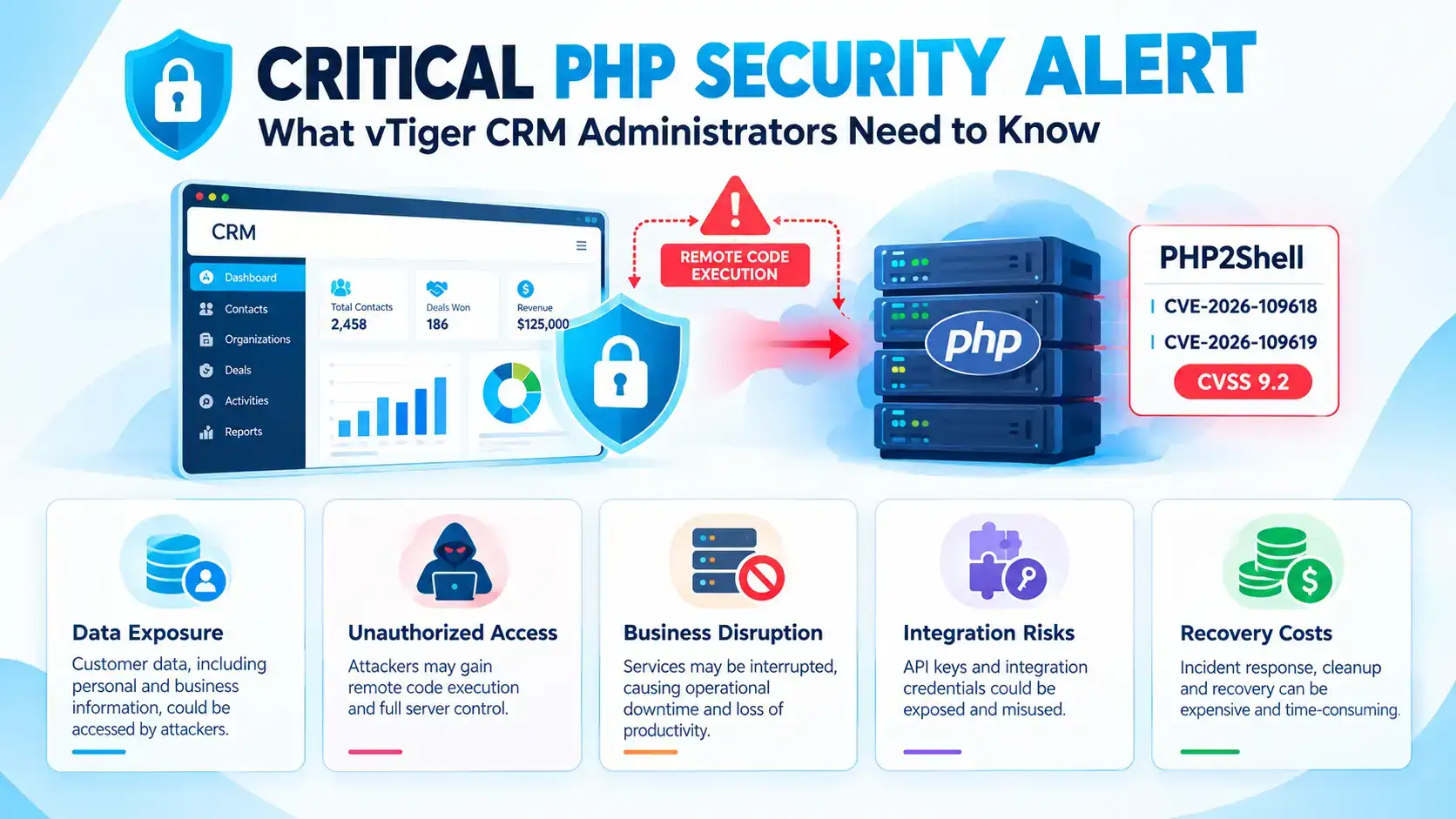
On October 21, 2026, the PHP development team released emergency security updates addressing two critical vulnerabilities, CVE-2026-109618 and CVE-2026-109619, associated with the name PHP2Shell. Both vulnerabilities have a CVSS score of 9.2 and may allow an attacker to execute code on an affected server without logging in.
PHP is the technology that helps many web applications run behind the scenes. Because vTiger CRM installations commonly depend on PHP, the security of the PHP runtime is an important part of protecting your CRM.
The official PHP team has urged users to update immediately. Security advisories also report that proof-of-concept exploits are circulating, increasing the urgency of addressing affected systems.
The important point: A secure CRM requires more than a strong password. The underlying server and PHP version must also be protected.
Official references: PHP Security Advisory | CERT-EU Security Advisory
What Are the PHP2Shell Vulnerabilities?
You do not need to be a developer to understand why these vulnerabilities matter.
Imagine your CRM server as an office building. PHP is part of the system that processes incoming requests and carries out instructions. A vulnerability in that system could allow a malicious visitor to exploit the server before the CRM application has a chance to handle the request normally.
The two vulnerabilities involve problems with how PHP manages memory and internal request data.
1. CVE-2026-109618: Memory Handling Failure
PHP manages computer memory while processing requests. Under certain conditions, a specially crafted request can cause an out-of-memory error while PHP is handling data.
The resulting cleanup process may mishandle internal data, potentially creating an opportunity for an attacker to execute code.
In simple terms: A failure while the server is processing a request can leave part of its internal state in an unsafe condition.
2. CVE-2026-109619: Stale Internal Data
PHP also uses internal data while processing requests. In certain circumstances, information can remain referenced after the memory it used has been released. A later request handled by the same worker may encounter that stale state.
This can create another path to a serious security compromise.
In simple terms: The server may attempt to use information that should no longer be there, potentially allowing an attacker to interfere with its operation.
Both issues affect the PHP runtime itself, rather than a particular vTiger CRM module.
Why Should vTiger CRM Users Be Concerned?
Your vTiger CRM installation may contain much more than contact names and telephone numbers. Depending on your configuration, it may store customer histories, sales information, business documents, support records, integration credentials, and other sensitive data.
If an attacker successfully compromises the underlying server, the consequences could extend beyond the CRM application.
Potential consequences include:
- Customer data exposure: Information stored in CRM records or accessible through the server may be at risk.
- Unauthorized server activity: An attacker may be able to execute code with the privileges of the affected PHP worker.
- Business disruption: A compromised server may require emergency investigation, recovery, or temporary isolation.
- Integration risks: Credentials and tokens accessible to the compromised environment may also require review.
- Recovery costs: Investigating an incident and restoring a trusted environment can consume time and resources.
These are potential consequences of a successful compromise, not evidence that every vTiger CRM installation has been affected.
Are Older vTiger CRM Installations at Greater Risk?
Older, self-hosted installations deserve particular attention when they rely on unsupported PHP versions, outdated operating systems, or custom code that prevents straightforward upgrades.
However, an older vTiger version does not automatically mean your server is exploitable, and a newer CRM version alone does not guarantee protection.
Your actual exposure depends on factors such as:
- The PHP version and whether the relevant security fixes are installed.
- The operating system and whether its vendor has backported the security patches.
- The web server and PHP execution configuration.
- The CRM version, custom modules, extensions, and integrations.
- Whether the server is publicly accessible and how it is protected.
For this reason, administrators should assess the complete environment rather than relying on the CRM version number alone.
Which PHP Versions Need Attention?
The PHP project released the following fixed versions on October 21, 2026.
| PHP branch | Fixed upstream version | Recommended action |
| PHP 8.5 | 8.5.12 | Update to the fixed release or a later applicable security release |
| PHP 8.4 | 8.4.27 | Update to the fixed release or a later applicable security release |
| PHP 8.3 | 8.3.36 | Update to the fixed release or a later applicable security release |
| PHP 8.2 | 8.2.35 | Apply the fix and plan a supported-version upgrade |
| PHP 8.1 and older | Requires vendor-specific verification or migration | Check for an applicable backported fix or plan a migration |
Important: These are the upstream PHP release numbers. Linux distributions and hosting providers may deliver the fixes through their own packages, sometimes without changing the apparent upstream version number. Confirm the security status with your operating-system or hosting vendor.
PHP 8.2 is also approaching its upstream end-of-life date of December 31, 2026, so organizations using it should plan their next upgrade.
Reference: Official PHP security advisory
How to Check Whether Your vTiger CRM Server Is Affected
If you administer a self-hosted vTiger CRM installation, start with these checks.
Step 1: Identify Your PHP Version
Ask your server administrator or hosting provider which PHP version your CRM actually uses.
For a server administrator, the following command can help identify the PHP version available in the command-line environment:
php -v
Important: The command-line PHP version may differ from the version used by the website. Confirm the PHP version used by the actual web server or PHP-FPM pool as well.
Step 2: Verify the Security Patch
Compare your installed package against the relevant vendor security advisory.
Do not assume that a version is patched simply because it is labelled as an older release with a vendor-maintained security update. Ask the vendor to confirm that the fixes for both CVEs have been applied.
Step 3: Review Your CRM Compatibility
Before upgrading PHP, verify that your vTiger version, custom modules, third-party extensions, and integrations support the intended runtime.
An unsupported PHP upgrade can break older applications, so the goal is to achieve both security and compatibility.
Step 4: Review Server Exposure
Determine whether the CRM, customer portal, upload endpoints, or other web-accessible components are exposed to the public internet.
Review access controls, web server configuration, file permissions, security monitoring, and backup arrangements.
Step 5: Check for Signs of Compromise
If the server was running a vulnerable build, review available web server logs, PHP logs, system activity, authentication records, and other relevant security telemetry.
Look for unexpected processes, unusual outbound connections, suspicious file changes, unexpected administrative activity, or other indicators identified by your security team.
Patching is essential, but it does not establish that a server was never compromised. If you suspect an intrusion, preserve relevant evidence and involve your security or incident-response team.
What Should You Do Immediately?
We recommend prioritizing the following actions.
1. Apply the appropriate PHP security update.
Update to a fixed release or the corresponding security-patched package supplied by your operating-system or hosting vendor. Test the update against your CRM environment before production deployment whenever possible.
2. Restrict unnecessary public access.
Where practical, limit administrative access through a VPN, IP allowlist, or other appropriate access controls. If a critical system cannot be patched promptly and remains exposed, consider isolating it from public networks until the risk is addressed.
3. Review PHP configuration and request limits.
The official PHP advisory describes temporary measures involving request-size limits and disabling session.upload_progress.enabled. These settings may reduce exposure to particular attack paths, but they are not a substitute for applying the security fixes.
Have a qualified administrator assess the appropriate settings for your environment. Do not make arbitrary memory or upload-limit changes that could destabilize your CRM.
4. Protect backups and credentials.
Confirm that backups are current, protected from unauthorized modification, and restorable. Review credentials and tokens if there is evidence or a reasonable suspicion that the server may have been compromised.
5. Plan the CRM and PHP upgrade together.
If your current vTiger installation cannot run on an appropriately secured PHP version, create a compatibility and migration plan. This may involve code changes, extension replacements, database testing, and a staged production rollout.
How CRMTiger Can Help
Upgrading a business-critical CRM requires more care than updating a single software package. Custom modules, workflows, integrations, and years of customer records all need to be considered.
The CRMTiger team can help you assess your vTiger environment and determine an appropriate path forward.
Depending on your requirements, assistance may include:
- Version and environment review: Identify the vTiger version, PHP runtime, hosting setup, and upgrade constraints.
- Compatibility assessment: Review custom modules, third-party extensions, and integrations for the proposed target environment.
- Migration planning: Define a staged upgrade approach with testing, backup validation, and data-integrity checks.
- Deployment coordination: Plan the rollout to reduce disruption to sales, support, and other business operations.
- Post-upgrade verification: Help validate essential CRM functionality and investigate compatibility issues within the agreed scope.
A review can help you understand what needs to change before committing to a migration. The appropriate solution will depend on your existing installation and infrastructure.
Protect Your CRM Before a Security Issue Becomes a Business Issue
The PHP2Shell vulnerabilities are a reminder that CRM security depends on the entire technology stack, not just the application itself.
If your organization uses an older or self-hosted vTiger CRM installation, verify your PHP security status, apply the appropriate fixes, and review your upgrade options as soon as possible.
Need help reviewing your vTiger CRM environment?
Contact the CRMTiger team to discuss your current version, PHP compatibility, security concerns, or migration requirements.
Email: support@crmtiger.com
Website: https://crmtiger.com/
Book Your Free vTiger Security Audit with the CRMTiger Team
Let’s work together to keep your CRM environment secure, reliable, and ready for the future.


Leave a Reply