Description
vTiger AI Connector
Work in your CRM by asking your AI assistant.
The vTiger AI Connector turns everyday CRM work into a quick request. Ask your AI assistant to log today’s hours, create a lead, move a deal to the next stage or pull this week’s numbers, and it happens in vTiger in seconds, using your own access.
Key Features
Plain-English CRM Actions
Create, update, search and report on records by asking in your own words. No screens or clicks.
Universal Module Support
Works with all standard and custom modules, including Leads, Contacts, Organizations, Opportunities, Tickets and Projects. Custom fields are read live from your CRM.
Daily Timesheets
Log time against tasks and projects and see your totals, for teams that track time in vTiger.
Your Permissions, Always
Each user signs in with their own vTiger login, so roles, profiles and row-level sharing apply to every action.
Safer Updates
Every change is checked against your live CRM setup, including required fields and picklist values, before it is saved.
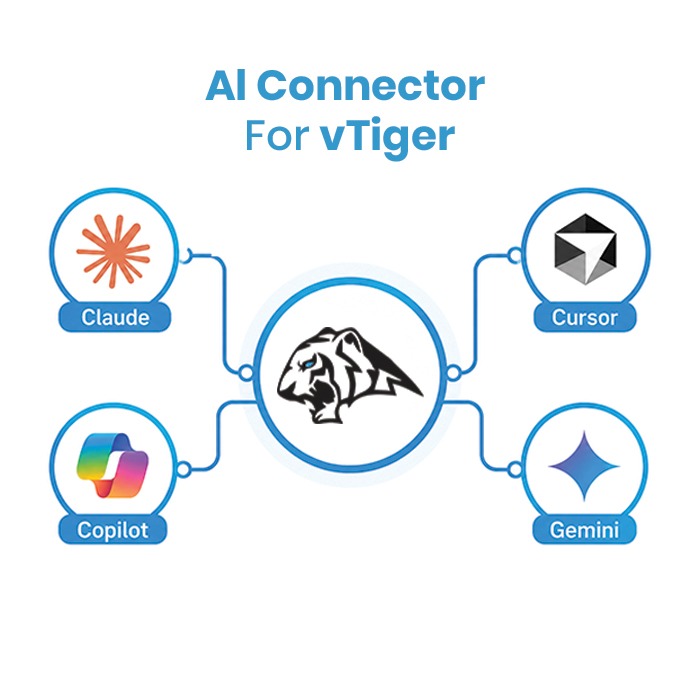
Works With Your AI Tools
Claude (web, desktop and Claude Code), Cursor, VS Code with Copilot, Windsurf, Gemini CLI, OpenAI Codex and any MCP-compatible tool.
Built for Teams
Add the connector once for your team. Each member signs in with their own vTiger account.
Nothing to Install
Runs as a secure hosted service using vTiger’s built-in web service API. No module install and no changes to your CRM files.
All vTiger Versions
Supports self-hosted vTiger 6.x, 7.x and 8.x.
License & Support
Hosted Service, Nothing to Install
Runs on our secure servers. No Module Manager install and no files added to your CRM.
Core Code Safe
We do not modify your core code. The connector works only through vTiger’s built-in web service API.
Free Support
Up to 10 hours of free support within 3 months from the date of purchase.
After this period, standard hourly support rates will apply.
Always Up to Date
Updates and new features are released to the hosted service automatically and are included in your subscription.
Subscription & Billing
7-day free trial, then billed monthly.
If a renewal payment isn’t received, access for that CRM pauses until the subscription is renewed.
License
One license covers one vTiger CRM (one domain).
Refund Policy
No refunds applicable for products with a free trial.
Help
vTiger AI Connector – User Guide
Get started with vTiger AI Connector and learn how to install, configure, and use it effectively with vTiger CRM.
Need more help?
Live Chat: Start Live Chat
WhatsApp: Chat with us on WhatsApp
Email: support@crmtiger.com
Release Notes
Version: 1.0
Update Date: 26th November 2026
New Features
Natural-Language CRM Actions Create, update, search and retrieve records in any vTiger module from your AI assistant.
Timesheet Logging Log daily time entries against tasks and projects, with totals calculated for you.
Team Sign-in Secure sign-in where each user connects with their own vTiger access, ready for team workspaces.
Live Schema Validation Checks required fields and picklist values before saving, with clear messages when something needs fixing.
Multi-Version Support Tested on self-hosted vTiger 6.5, 7.1 and 8.3.
FAQ
1. Do I need my own AI subscription to use the connector? Yes. The connector works with the AI assistant you already use, such as Claude, Cursor, VS Code Copilot or Gemini CLI. The AI subscription is not included, and any AI plan or usage charges are billed directly by your AI provider.
2. Which AI tools does it work with? Claude (web, desktop and Claude Code), Cursor, VS Code with GitHub Copilot, Windsurf, Gemini CLI, OpenAI Codex, and any other tool that supports MCP (Model Context Protocol). Step-by-step setup for each is at https://mcp.crmtiger.com/docs.
3. Which vTiger versions are supported? Self-hosted (open-source) vTiger 6.x, 7.x and 8.x. vTiger Cloud (hosted on vtiger.com) is not supported.
4. Which vTiger modules are supported? All standard and custom modules your vTiger user can access, including but not limited to:
- Leads
- Contacts
- Organizations
- Opportunities
- Tickets
- Projects and Project Tasks
- Any custom module
5. Do I need to install anything on my CRM? No. The connector uses vTiger’s built-in web service. Your CRM only needs its web service endpoint (webservice.php) reachable over HTTPS.
6. Does it respect each user’s permissions? Yes. Each user signs in with their own vTiger username and Webservice Access Key, so vTiger applies that user’s role, profile and sharing rules to every request.
7. Can my whole team use it? Yes. Add the connector once (for example, in a Claude Team workspace) and each member signs in with their own vTiger account.
8. Where do I enter my license key? When you first connect, the sign-in page asks for your vTiger details and the license key from your crmtiger.com account.
9. Where do I find my Webservice Access Key? In vTiger, open My Preferences and copy the Webservice Access Key. It is different from your login password.
10. Does the connector store my CRM data? No. CRM records are read and written in real time and are not stored. We keep only the connection details needed to sign you in, encrypted at rest.
11. Can the AI delete records? Deletion is turned off by default. All other changes follow your vTiger permissions.
12. What happens after the free trial or if a payment is missed? The 7-day free trial converts to a monthly subscription. If a renewal payment isn’t received, the connector pauses for that CRM until the subscription is renewed.
13. Can I use it in other languages? Yes. You can ask in your own language; language support depends on the AI assistant you use.




Reviews
There are no reviews yet.